1
Choose a deal to redeem
Have a look at the offers and discounts available to redeem and select the one that offers you the best discount. Redeem the discount code you choose by clicking on the green ‘Get Code’ button.
2
Head to their website
Redeeming the code will reveal the special discount code that needs to be copied and saved for the checkout section. After you copy the code, switch tabs to the newly opened INTIMISSIMI tab.
3
Shop
Shop for timeless pieces you need to upgrade or refresh your wardrobe. Once you are done, look for the ‘checkout’ button on the side panel that pops up with the items in your shopping bag.
4
Delivery options
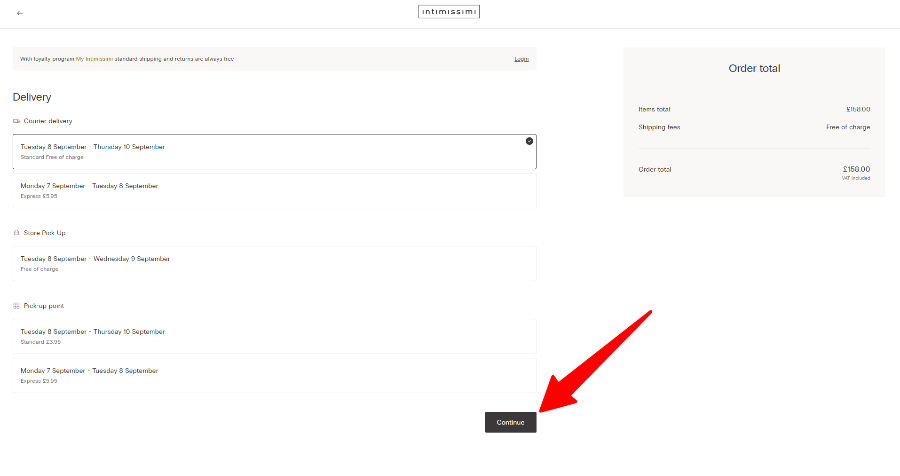
Select the delivery option that you are happy with and click the ‘continue’ button.
Look at the image below for extra guidance.
Note: This is the part you can log in to earn loyalty points for your purchase.
5
Checkout
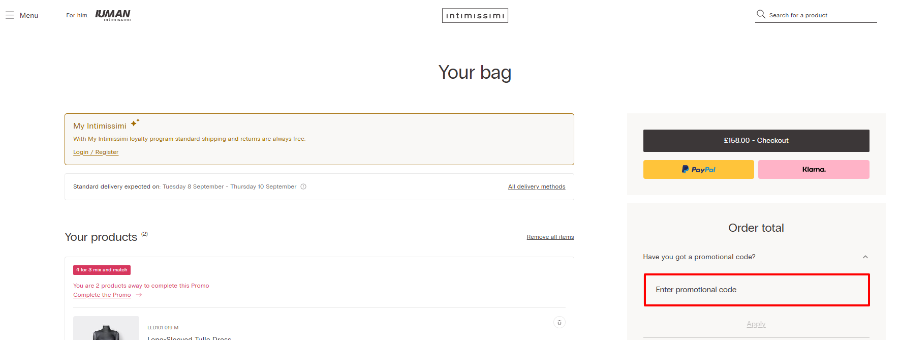
Follow the prompts to add your delivery address. This is also where you can select gift wrapping if this is a gift. After the gift wrapping option, you will see a drop-down box that says ‘‘Have you got a promotional code?’’, click on it, enter your discount code into this box and click “Apply”.
Enter your payment details and there it is, you have successfully used a discount code and received a substantial discount!