Love Discount Vouchers United Kingdom
Huawei discount codes and voucher codes

Huawei Discount Codes

4.0 (7 ratings)
4 active offers Best Deal: 10% Off

Best Huawei Discount Codes and Deals for July 2026

Code

Save an extra 10% on the HUAWEI WATCH Ultimate 2, the premium smartwatch with advanced health tracking and all day battery life.

9
Did this code work for you?
  • Added by Jess

Terms and conditions

  • little period of time only.
  • Applicable to specific products.
  • Use the code to receive the offers.
  • Not compatible with any other deals.
  • Kindly check the brand's website for all terms and conditions.
Code

Grab an extra 10% discount on the innovative HUAWEI WATCH D2, combining health monitoring and stylish design at Huawei.

10
Did this code work for you?
  • Added by Jess

Terms and conditions

  • little period of time only.
  • Applicable to specific products.
  • Use the code to receive the offers.
  • Not compatible with any other deals.
  • Kindly check the brand's website for all terms and conditions.
Code

Save an extra 10% on Huawei FreeBuds Pro 4 and enjoy premium sound with active noise cancellation technology.

9
Did this code work for you?
  • Added by Jess

Terms and conditions

  • little period of time only.
  • Applicable to specific products.
  • Use the code to receive the offers.
  • Not compatible with any other deals.
  • Kindly check the brand's website for all terms and conditions.

Never miss cashback. Our free Chrome extension alerts you automatically at every partner store.

Add to Chrome – It's Free

Sign up to the newsletter for special offers and promotions.

  • 15 people have used this

How Do I Use My Huawei Coupon Code?

If you’re looking for a discount on your online purchase at Huawei then you’ve come to the right place. All you have to do is follow the steps below to save money on your next smartphone or laptop. There is always a sale or discount available at Huawei to be redeemed, and it is our job here at Love Discount Vouchers to provide you with these amazing discount codes.

Step 1: Choose a coupon code from the ones listed above

Choose the coupon code from above that you’d like to redeem and it will reveal itself. For example, if you’re looking for 10% off orders at Huawei then find the coupon above, and click on "Get Code" to reveal the code.

Step 2: Copy your coupon code

Simply copy the code that is presented to you. You need this code in order to inform Huawei to remove part of the cost of your total order.

Step 3: Click on 'Go to the Huawei site'

After you click, you will be directed to Huawei.

Step 4: Start Shopping!

Find the smartphone or laptop you’d like to purchase at Huawei and add them to your bag/cart.

Step 5: Make your purchase!

When you are ready to buy your items, go to Cart/Bag in the top right-hand corner. You can now start to make your purchase by clicking on 'CHECKOUT'. You may need to either sign in or create an account.

Step 6: Enter the code at the Huawei checkout

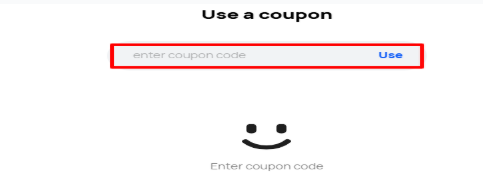
Now that you have the code copied, simply paste it into the “Use A Coupon label at the checkout. Check out the image provided below for an example in case you have any difficulty. If you’re on a computer or laptop, then you will usually find the coupon code box to the left of the checkout page.

Checkout uk

However, if you’re on a mobile then it is just as easy to find the coupon code box you need. It is usually present on the checkout form.

Step 7: Enjoy!

Your discount will be applied and items should arrive in the post in just a few days, happy shopping!

Always note: There are terms and conditions associated with certain codes which you must comply with (like applying a code after meeting a maximum amount of money spent) and you cannot apply a code after submitting your order.

Extra Things You Need To Know About Using Huawei’s Discount Code

Why is my Huawei discount code not working?

There are several reasons why your Huawei code might not be working:

  • The Huawei code you are using might have expired.
  • You might be applying the Huawei code to certain items that do not accept discount codes, like sale items.
  • You have already used this same code when shopping before at Huawei.
  • You have not spent the minimum amount of money. Sometimes in order to apply a Huawei code, you have to spend a certain amount of money, and that might be the reason why the code is not working.
  • You have taken the Huawei code from an international deals site, which probably doesn't apply to Huawei.
If you ever find that one of our Huawei codes here at Love Discount Vouchers to be not working, please let us know and we'll make sure to fix the problem!

What Payment Methods Do Huawei Accept?

  • Credit and Debit Card
  • Visa
  • Mastercard
  • American Express
  • Klarna

Do Huawei Offer A Buy Now Pay Later Option?

Klarna

Yes, Huawei offer Klarna - the ‘buy now, pay later, no extra cost’ option which allows you to pay in full up to 30 days later or split the cost into monthly payments.

Klarna

To use Klarna:

  • Add items to your cart and select Klarna as your payment method
  • Enter basic customer details and provide your payment information
  • Klarna will send you an email confirmation of the payment schedule, and reminders when it’s time to pay
Huawei Money-Savings Hints & Tips

Here are some great tips & tricks for extra savings at Huawei:

  • Use Klarna as a buy now pay later option.
  • Always check Love Discount Vouchers for the latest money-saving discount codes and deals at Huawei before you finish your purchase.
  • Be sure to check out any sales, offers or discount sections on the Huawei website to find any promotions or discount offers.
  • Join the Huawei newsletter to get the best offers, money-saving promotions and exclusive deals sent straight to your inbox.
  • Follow Huawei on social media to stay updated with any new arrivals or offers.

Reasons To Shop At Huawei

  • Wide variety of high-quality electronic products
  • Reasonable and affordable prices
  • Flat fee shipping
  • Great offers available
  • Mobile AppGallery
  • Easy returns

Huawei AppGallery

App

Huawei AppGallery is the start of an extraordinary, new way to discover the world of apps. It's an open platform to search, explore and download apps that have your security and privacy at its heart.

Safety first

Huawei has built the AppGallery from the ground up to strictly protect your privacy. You can be confident that its built-in security system will keep you safe.

Growing strong

Millions of people are using the Huawei AppGallery every month to find the apps that they want, with more apps being added every day.

Explore the world of apps

Discovering new apps is easy with top apps listed by category and editors regularly picking their favourites so that you don't have to.

Download Huawei app today on Google Play Store and Huawei App Store.

Huawei Trustpilot Reviews - Worldwide

Huawei is an International phenomenon when it comes to technology. They offer exceptional customer service and want you as their consumer to enjoy their products. Below are a few reviews from their trusted customers.

MA – GB

‘Have Huawei mobile and laptop and love them!’

Charlie Zhang – GB

‘Really good services and well priced.’

Alan Gingrich – US

‘My experience with Huawei Support and the MicroGen device has been extraordinary! Kally and everyone at Spooky2 is fantastic and attentive, helpful, friendly, and patient. If I could give ten stars I would!’

Diana Matthews – US

‘I have a P20 and I like it, I have had it for almost 4 years without problems’

YoBachi – NG

‘I could say that everything I've ever wanted is there! The price is affordable. I could play games as much as I wanted. No glitches. The camera also had a beautiful night mode’

Huawei Shipping & Delivery: What Do I Need To Know?

  • Standard Delivery: The delivery will be fulfilled on working days (from Monday to Friday). Orders usually ship within 1-2 working days depending on the payment confirmation and your selected delivery address and the availability of your items in the warehouse. Delivery is free for orders of £99 or over.
  • Next Working Day Delivery: To get delivery on the next working day, you will need to receive your Order Payment Confirmation by 16:00 GMT, from Monday to Friday. Please refer to the timings on their website to see when your item will arrive.
  • Order Payment Confirmation before 16:00 GMT, Monday to Friday, take delivery next business day. Order Payment Confirmation after 16:00 GMT, Monday to Thursday, and take delivery two business days later. Order Payment Confirmation on Saturday or Sunday Take delivery on the following Tuesday
  • Where available, you can choose a scheduled delivery method for your shipment, like Home Delivery, or Pickup Point Service. You will also find the applicable delivery costs at the order checkout when you purchase online, on the order confirmation.
  • The product(s) will be delivered to the delivery address you specify in your order. A signature may be required to receive your item. If you have not received the product(s) within the estimated delivery time specified in the dispatch confirmation, you should contact them via their website or by email or by telephoning the customer call centre.
  • Orders can be delivered only in the United Kingdom (excluding Jersey, Guernsey and Isle of Man). They don`t support cross border delivery. For more information contact their Huawei Customer Support team.

Huawei Returns and Refunds: What Do I Need To Know?

  • Once your products purchased on this website are delivered, you have 14 days to decide whether or not to keep them. This period starts after the day you received your products.
  • You then have a further 14 days to send the products back after you submit your return request. This period starts after the day you submit your return request.
  • Please note that you can return the extended warranty within 14 days of purchase only by contacting their customer service team through Hotline, Live Chat or Email. Please visit their contact form on their website for more details.
  • If you are returning the product(s) from addresses in the United Kingdom (excluding Jersey, Guernsey and Isle of Man), you can obtain a pre-paid return label from them. You can choose the pick-up (Monday to Friday, excluding Bank Holidays) or drop off service offered by our designated courier. If you don’t use the return label provided by them, you may need to bear the cost of returning the products.
  • The products must be returned in good and undamaged condition. You will be responsible for any reduction in the value of the product as a result of handling the goods more than is necessary to inspect them. To ensure that you will get the full refund, please also return all accessories.

Huawei FAQs

Do I need to create an account to make a purchase on Huawei website?

No. You can make purchases on the Huawei website without registering an account through "Guest Checkout". If you do so, it's essential that the contact details are accurately completed. They use these details to send you your order information and contact you for any matters relating to your order.

When will I get an order number?

You will get an order number when you complete the payment.

How do I know if an item is in stock?

When an item is in stock, the buy now or add to cart buttons will be available. If an item is out of stock, you will see Notify me instead. In this case, you can click notify me to let you know when the item is available. Please note that they cannot guarantee how long the stock will last and if the item is out of stock again, you’ll need to sign up again to be notified.

Can I edit the order information (recipient, address, etc.) after payment?

No. You cannot modify your order information after the payment has been made.

What happens if I don't return a product in full (e.g. you don't return the accessories)?

If any parts(s) or item(s) of a product are not returned, they may deduct an appropriate amount from the refund. If you return the missing item(s) at a later date, you must bear the shipping cost by yourself.

What should I do if I have lost the warranty certificate?

Huawei bases their commercial warranty status on the device's SN number. In case of a claim, you will also be able to use the invoice as the basis for your warranty. Please see Warranty Notice for more details.

How long does it take to repair a defective product?

Huawei will do their best to complete repairs in 14 days.

Are there any costs for warranty repair if the device is repaired within the warranty period?

Repairs performed under commercial and legal warranties are free of charge. For more details, please see their Terms of Sale and Warranty Notice.

How do I use a coupon code at Huawei?

The team at Love Discount Vouchers spend a lot of time collecting the best and most recent Huawei coupon codes. The team also explains how to use Huawei’s coupon codes. Scroll up and read the ‘How do I Use My Huawei Coupon Code?’ section to find out more.

How often does Huawei release coupon codes?

Every brand is different. Some brands release regular coupon codes, some don’t release any and some release them at special times in the year. The team at Love Discount Vouchers spend hours every day looking for the best coupon codes and if Love Discount Vouchers has offers available, they will try and list them here.

Huawei Pros & Cons

Pros

  • Warranty on products
  • Subscribe and save
  • Secure online payments

Cons

  • No student discount codes
1484
people found this helpful
4/5

Similar brands Like Huawei To Shop At

  • Tech For Less – Tech For Less has been in business since early 2001 and they are one of the world’s largest stocking vendors of new, open box and refurbished computer equipment, peripherals, and electronics.
  • Gtech – Gtech is an online shopping platform where customers are offered a wide range of tools used in homes and gardens.
  • Tech21 – Tech21 offers exceptional phones and other accessories they know that what matters is knowing that the customers’ device is safe from the bumps and scrapes of everyday life.

Huawei Contact Details

If you need to get in touch with Huawei about an order, an inquiry, or anything else, there are a number of ways you can do this.

Contact Form

Contact Huawei via their contact form and they will get back to you asap.

Phone

Give Huawei a call at 0800 088 6700, and they will be more than happy to help.

DM on Facebook Messenger

You can DM Huawei on Facebook, and you’ll be directed to write your inquiry.

DM on Instagram

You can DM Huawei on Instagram, and they will attend to your inquiry asap.

DM on Twitter

You can DM Huawei on Twitter, and they will be more than happy to attend to your inquiry.

Huawei Opening Hours

Huawei is an online retailer that is open 24/7

You can speak to Huawei via phone Monday to Friday, 9:00 am – 9:00 pm; Saturday and Sunday, 10:30 am – 3:30 pm (Except Bank Holidays) | English

What makes Huawei stands above other similar online retailers is their brilliant customer service. They put their customers as a top priority. Their team responds as quickly as possible and through various platforms like Facebook, Twitter and Instagram. Whatever your inquiry is, Huawei is always there to help you!

More discount codes like Huawei